
The signature history component is a visual tool that can be added to any platform object (such as Account, Opportunity, or Case). It allows users to view, in a centralized manner, the complete history of an envelope—from creation and sending to the progress of signatures and completion. This component makes it easy to track each step of the process, improving envelope management and monitoring.
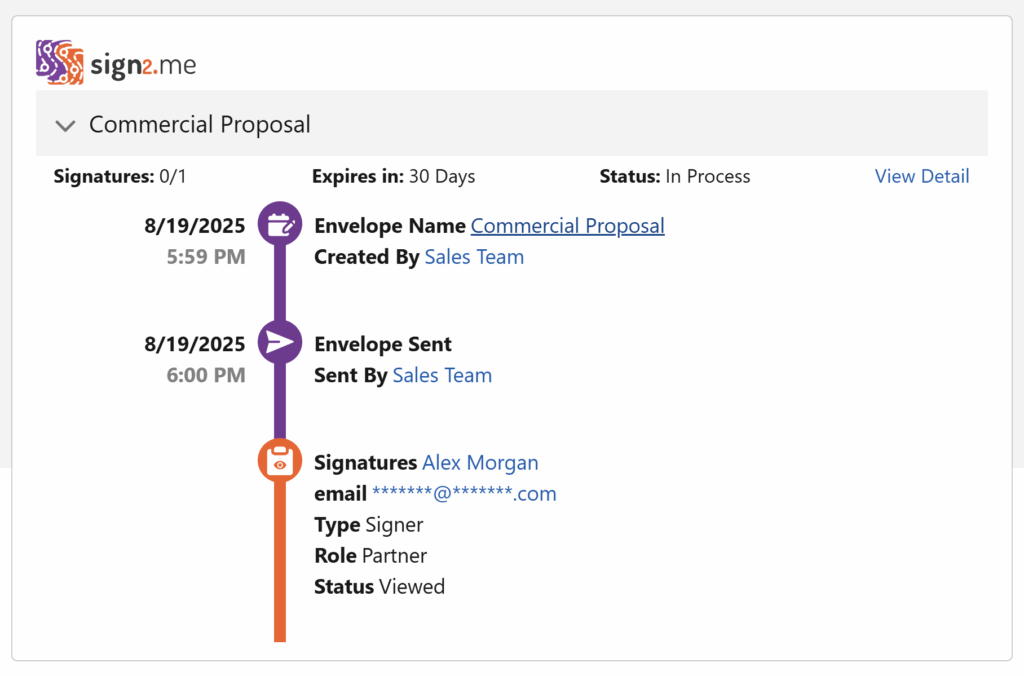
Current Envelope Section
Displays all details of the envelope currently in the signing process.
General Information
- Signatures: Total signatures completed and total number of envelope recipients.
- Expires in: Number of days remaining until the envelope expires.
- Status: Shows the current stage of the envelope in the signing process.
View Detail
A link that allows you to view the final construction of the document based on operations completed so far.
Envelope History Sections
Sections use colors to indicate status:
- Purple: Event has occurred / completed
- Orange: Event has not occurred / not completed
Specific Components:
Envelope Creation
- Date and time of creation
- Envelope Name: Name of the envelope
- Created By: Salesforce user who created the envelope
- Date and time of creation
Envelope Sent
- Date and time of sending
- Sent By: User who sent the envelope
- Date and time of sending
Document Signed
- Signatures: Name of the signer
- Email: Signer’s email
- Type: Type of signature
- Operators: Only creates the document, does not sign
- View Only: Only views the document
- Signer: Signs the document
- Operators: Only creates the document, does not sign
- Role: Signer’s role in the process (e.g., witness, approver)
- Status: Action performed by the signer so far
- Signatures: Name of the signer
Document Viewed
Indicates that the signer viewed the document but did not sign. The status appears as Viewed.

Document Declined
Indicates that the signer declined the document. The status appears as Declined.